One-time password
What is One-Time Password (OTP) and 2-Step Verification
2-Step Verification (aka: two-factor authentication) requires a one-time password or other second step after you entered your password. It adds an extra layer of security to your account in case your password is stolen.
A one-time password (OTP) is an automatically generated numeric or alphanumeric string of characters from the site with 2-step verification enabled that authenticates a user for a single transaction or login session. An OTP is more secure than a static password, especially a user-created password, which may be weak and/or reused across multiple accounts.
Enable 2-Step Verification for the services you are using
Here are steps of how to enable 2-step verification for most sites
1) Open the site https://2fa.directory/us/
2) Enter the site name for which you want to enable 2-step verification in to the address bar
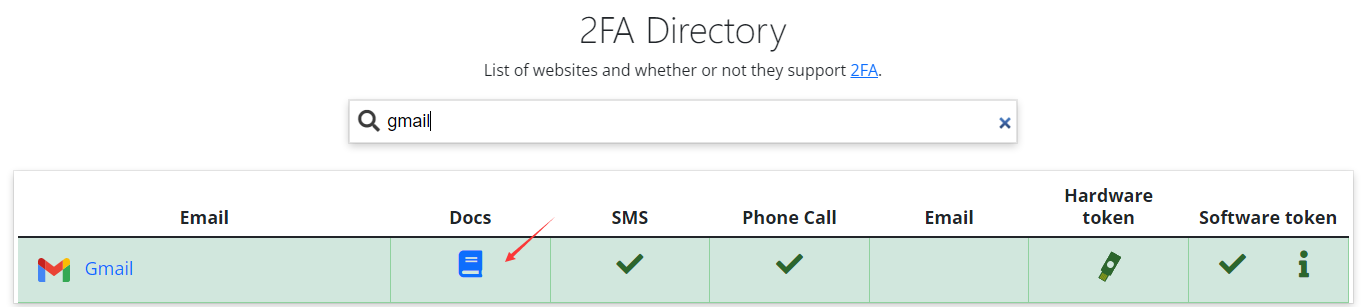
3) Click on the Docs icon to find the steps for how-to enable 2-step verification
Authorize DualSafe Password Manager to access and auto fill one-time passwords
Before you can authorize DualSafe Password Manager to save and access the one-time passwords, you need to enable the 2-step verification for the sites. Then please follow the steps below:
1) Open DualSafe Password Manager to add login info of the website with 2-step verification enabled. If the website login info has already been saved, please find it to choose Edit
2) Find the secret key (Or URL like otpauth://*) of the website
Note:
- Normally the secret key has been sent to your email address when you signed up or turned on 2- Step Verification for the website.
-Some websites use a QR bar as the secret key. In this case, you can choose “Cannot scan QR code” and follow the steps to generate the secret key
3) Copy and paste the secret key (Or URL like otpauth://*), and save it into DualSafe Password Manager
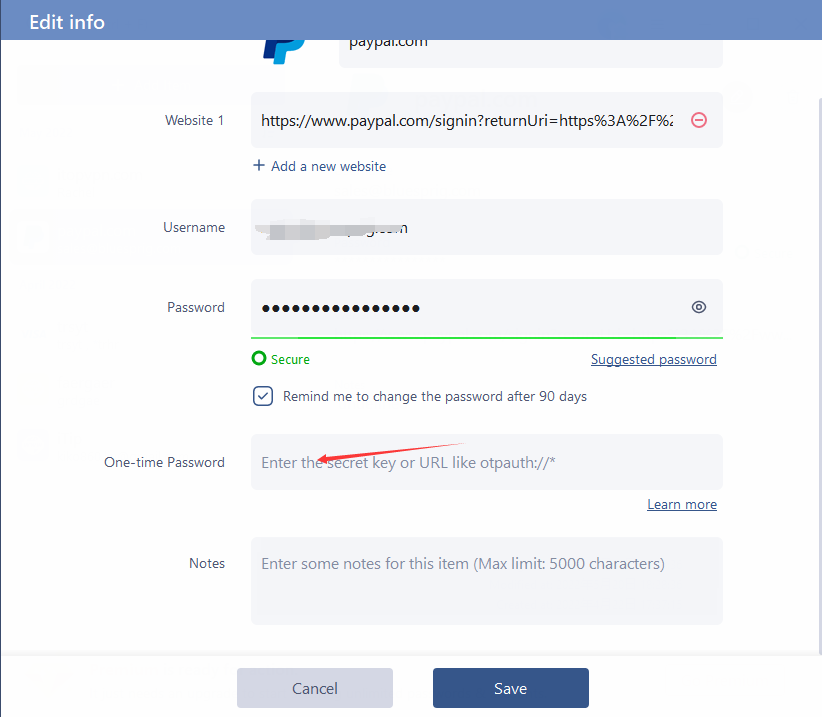
4) Enable auto fill feature in the Settings of DualSafe Password Manager
After that, DualSafe Password Manager can auto fill the one-time passwords for the websites where you’re using 2-factor authentication.